What is the primary purpose of XML to XML mapping?
The primary purpose of XML to XML mapping is to transform data from one XML structure into another, facilitating seamless communication and data exchange between disparate systems or applications. It enables interoperability, ensuring that data, despite originating from different sources with varying schemas, can be accurately interpreted and processed by target systems, which is crucial for modern data integration.How do XML schemas impact the mapping process?
XML schemas fundamentally define the structure, content, and data types of XML documents, acting as blueprints for your data. In mapping, schemas dictate what elements and attributes are available and how they are organized in both the source and target. Understanding these schema differences is paramount for correctly defining transformation rules and ensuring the mapped output adheres to the target system's expectations.What are the essential steps for successful XML to XML mapping?
Successful XML to XML mapping involves several essential steps: first, thoroughly analyzing both the source and target XML schemas; second, choosing the appropriate mapping tool or method (e.g., XSLT, visual mappers); third, defining the transformation logic, including any conditional rules or aggregations; and finally, rigorously testing and validating the mapped output to ensure data integrity and compliance with the target schema.Are there common tools used by US professionals for XML mapping?
Yes, US professionals commonly use a variety of tools for XML mapping. These include dedicated visual mapping tools like Altova MapForce, which offers a drag-and-drop interface for complex transformations. For developers preferring code-based solutions, XSLT processors integrated into IDEs like Oxygen XML Editor are popular. Additionally, enterprise-level integration platforms from vendors like MuleSoft or Apache Camel often incorporate robust XML mapping capabilities for large-scale data workflows.How can I ensure data integrity during XML data transformation?
Ensuring data integrity during XML data transformation is critical. This involves several best practices, including rigorous validation of both source and target data against their respective schemas, implementing clear error handling and logging mechanisms for transformation failures, and thorough unit and integration testing with diverse datasets. Additionally, applying business rules consistently within the mapping logic and using data quality checks before and after transformation are crucial for maintaining accuracy.What troubleshooting tips are useful for XML mapping errors?
For troubleshooting XML mapping errors, start by examining detailed error logs generated by your mapping tool or XSLT processor. Verify that all required elements in the target schema are being populated. Check for namespace declarations, as mismatches often cause unexpected behavior. Debugging your transformation logic step-by-step, comparing intermediate XML outputs, and isolating problematic sections can help pinpoint specific issues related to data conversion or structural discrepancies.What is the role of XSLT in XML to XML transformation?
XSLT, or Extensible Stylesheet Language Transformations, plays a central role in XML to XML transformation by providing a powerful, declarative language to define how an XML document is converted into another XML document (or other formats like HTML or plain text). It allows for complex data manipulations, filtering, sorting, and conditional processing of XML data, making it highly versatile for intricate mapping requirements and a staple in many US data integration projects.Unlock the secrets to efficient data integration by learning how to map XML to XML. This comprehensive guide, tailored for US businesses and developers, dives into the critical process of transforming XML data structures for seamless interoperability. Discover why mastering XML data mapping is essential for modern data exchange, automating workflows, and ensuring accurate communication across diverse systems. We cover practical techniques, tool comparisons, common challenges, and expert troubleshooting tips to help you navigate complex data transformations with confidence. Whether you are looking to streamline operations, facilitate B2B communication, or migrate data, understanding XML to XML mapping empowers you to make informed decisions and implement robust solutions that drive efficiency and reduce errors. Learn to choose the right tools, apply effective mapping logic, and avoid common pitfalls, equipping you with the knowledge to optimize your data processes today. This guide ensures you grasp the value, mechanics, and best practices for robust XML data handling in 2026.
Questions & answers
What is XML to XML mapping used for?
XML to XML mapping is primarily used for data transformation and integration between different systems or applications. It enables diverse software platforms, often using varying XML structures, to exchange and understand data seamlessly. This process is crucial for tasks like B2B communication via EDI, system integrations, and data migration, ensuring interoperability in complex digital environments for US businesses.
How can I ensure data integrity during XML mapping?
Ensuring data integrity during XML mapping involves rigorous schema validation, implementing robust error handling, and comprehensive testing. Always validate both source and target XML against their respective schemas. Use conditional logic to handle missing data gracefully and log any transformation errors. Thoroughly test with diverse datasets to catch inconsistencies and confirm that data types and formats are correctly maintained throughout the mapping process.
What are popular XML mapping tools?
Popular XML mapping tools include Altova MapForce for its visual drag-and-drop interface, ideal for complex graphical mapping. For more programmatic control, Oxygen XML Editor is highly regarded for XSLT development and debugging. Enterprise integration platforms like MuleSoft also offer advanced XML mapping capabilities within their broader integration suites, catering to varied project scales and technical preferences across the US.
Is XSLT required for all XML transformations?
XSLT is not strictly required for all XML transformations, but it is a highly powerful and widely adopted standard for complex mapping. Simpler transformations might be handled programmatically using libraries in languages like Python or Java, or through visual mapping tools that abstract the underlying code. However, for intricate conditional logic, data aggregation, and highly customized outputs, XSLT often remains the preferred choice.
How do I handle complex data structures when mapping XML?
Handling complex data structures in XML mapping requires a meticulous approach. Start by thoroughly understanding the relationships and cardinality within both schemas. Utilize advanced XSLT functions for conditional processing, iteration over repeating elements, and aggregation of data. Visual mapping tools can help by providing graphical representations that clarify intricate element hierarchies, allowing you to define complex transformations more intuitively and with less error.
Where can US businesses get help with XML data integration?
US businesses can get help with XML data integration from various sources, including IT consulting firms specializing in data integration, freelance technical consultants, and software vendors offering managed integration services. Many of these providers have expertise in specific industries or platforms. Searching for 'XML integration consultants US' or 'data mapping services near me' can connect you with local experts who can assist with complex XML challenges.
Understanding how to map XML to XML is a cornerstone for seamless data exchange in today's interconnected digital landscape. Many US businesses juggle various software systems, each speaking its own data language, often rooted in XML. This process involves transforming data from one XML format into another, ensuring that information flows accurately and efficiently between applications that might use different XML schemas.
This guide will equip you with the practical know-how to tackle XML to XML mapping, providing a hands-on perspective crucial for developers and data professionals. We will break down the essential steps, highlight effective tools, and offer real-world troubleshooting tips to help you master this often-complex but vital skill. By the end, you will have a clear roadmap to implement robust data integration solutions, enhancing your organization's data fluidity.
| Aspect of XML Mapping | Key Benefit for US Businesses | Common Tool/Approach |
|---|---|---|
| Schema Analysis | Ensures accurate data interpretation | XML Schema Definition (XSD) tools |
| Data Transformation | Enables interoperability between systems | XSLT, visual mappers |
| Error Handling | Maintains data integrity and reliability | Validation frameworks |
| Scalability | Supports growing data volumes and complexity | Enterprise integration platforms |
What is XML to XML Mapping and Why Does it Matter?
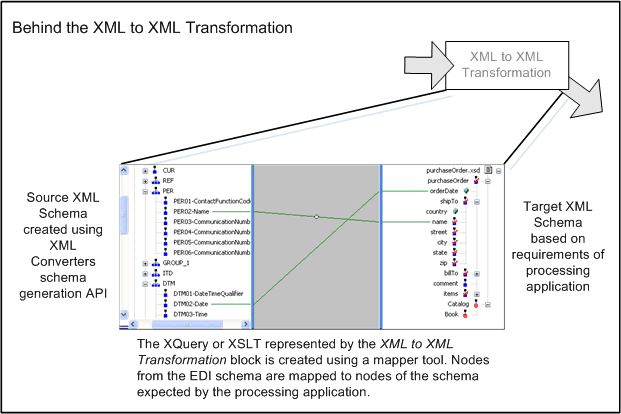
XML to XML mapping is the strategic process of defining how elements and attributes from a source XML document correspond to elements and attributes in a target XML document. Think of it like a universal translator for data, ensuring that disparate systems can understand each other's messages. This transformation is fundamental for many businesses that need to exchange data with partners, integrate internal systems, or migrate information between platforms.
The significance of XML mapping cannot be overstated, especially for US companies relying on Electronic Data Interchange (EDI) or Service-Oriented Architectures (SOA). Without effective mapping, data exchange becomes a manual, error-prone task that can cripple operational efficiency. Proper mapping streamlines workflows, reduces human error, and ensures data consistency across all integrated systems.
Common scenarios demanding expert XML mapping include integrating customer relationship management (CRM) with enterprise resource planning (ERP) systems, processing payment gateways, or synchronizing inventory data with e-commerce platforms. Each of these requires precise data transformation to maintain business continuity. Manual approaches often lead to significant delays and potential data loss, making automated mapping solutions indispensable for high-volume transactions.
One of the biggest hurdles is the inherent complexity of different XML schemas, which can vary wildly in structure, naming conventions, and data types. This variation necessitates a robust mapping strategy to bridge the gap effectively. Without a clear plan, projects can quickly spiral into complex, time-consuming endeavors that fall short of integration goals, impacting timely data flow and business decisions.
| Mapping Challenge | Impact on Data Flow | Primary Solution Focus |
|---|---|---|
| Schema Mismatch | Inaccurate data interpretation | Thorough schema analysis |
| Data Volume | Performance bottlenecks | Optimized transformation engines |
| Complexity | Increased development time | Visual mapping tools, XSLT |
| Maintenance | Costly updates over time | Version control, modular design |
How Do You Map XML To XML Step By Step?
Understanding Source and Target Schemas
The first step in any XML to XML mapping endeavor is a deep dive into your source and target XML schemas. You need to thoroughly analyze the structure, data types, and relationships between elements and attributes in both definitions. Ignoring this crucial stage often leads to mapping errors, corrupted data, and significant re-work down the line.
Many developers find schema visualization tools incredibly helpful for this analysis, as they provide a clear, graphical representation of complex XML structures. These tools can highlight required fields, optional elements, and data type constraints, which are all vital considerations for a successful mapping project. Taking the time here saves countless headaches later when data just isn't flowing correctly.
A common pitfall is assuming similar element names mean identical data structures or semantics. Always verify the context and business rules associated with each element in both schemas. Overlooking subtle differences in how dates are formatted or how addresses are structured can lead to validation failures or incorrect data interpretation, causing disruptions in integrated systems.
Choosing the Right Mapping Tool or Approach
Selecting the appropriate mapping tool or approach is pivotal for project success, balancing efficiency with control. Options range from visual drag-and-drop mappers to custom XSLT stylesheets and programmatic solutions using languages like Java or C#. Visual tools are excellent for less complex mappings, offering a user-friendly interface that accelerates development.
For projects with intricate transformation logic, such as conditional mapping, data aggregation, or complex calculations, XSLT (eXtensible Stylesheet Language Transformations) often proves more powerful. XSLT provides fine-grained control over every aspect of the transformation, allowing for highly customized output. Programmatic approaches offer the ultimate flexibility but require more coding effort and maintenance.
Consider your team's expertise, the complexity of the XML structures, and the volume of data you'll be processing when making this decision. Small-scale, straightforward mappings might benefit from simpler tools, while large enterprise-level integrations often demand robust, scalable platforms. The trade-off is usually between development speed and the level of customization you can achieve.
Implementing the Mapping Logic
With schemas understood and tools chosen, the next phase is to actually implement the mapping logic, defining how each piece of data moves from source to target. This involves direct element-to-element mapping, where a source element's value is directly copied to a target element. However, real-world scenarios often demand more sophisticated transformations.
Complex mapping operations include conditional logic, where data is transformed only if certain criteria are met, or data aggregation, where multiple source values combine into a single target field. For instance, you might concatenate first and last names into a 'FullName' field or sum up individual line item prices to a 'TotalAmount' element. Mastering these advanced techniques is key to handling diverse business requirements.
Always prioritize data integrity and implement robust validation mechanisms during and after the mapping process. This means checking for missing required fields, ensuring data types match, and validating against the target schema. Thorough testing with various data sets is indispensable to catch errors early, preventing bad data from entering your downstream systems and causing operational headaches.
| Mapping Implementation Stage | Key Action | Best Practice |
|---|---|---|
| Element-to-Element | Direct data transfer | Verify data types and lengths |
| Conditional Logic | Transform based on rules | Document all business logic clearly |
| Data Aggregation | Combine multiple inputs | Test edge cases with zero or many inputs |
| Validation | Ensure data quality | Implement schema validation post-transformation |
What are Common XML Mapping Challenges and How to Troubleshoot Them?
Even seasoned developers encounter headaches when mapping XML to XML, and understanding common pitfalls helps navigate these tricky waters. One frequent issue is handling namespace conflicts, where identically named elements from different XML namespaces clash, causing parsers to misinterpret data. Always explicitly define and manage namespaces in your mapping logic, ensuring clarity and preventing ambiguity.
Another prevalent challenge arises from missing or unexpected data in the source XML, leading to errors when the target schema expects specific information. Implementing default values, conditional mapping, and robust error logging can help mitigate these issues. Setting up clear error messages during transformation is crucial for quick troubleshooting, helping pinpoint exactly where data failed to conform.
Maintaining XML mappings over time as schemas evolve is a continuous battle for many organizations. When a source or target schema changes, existing mappings can break, requiring updates. Adopting a modular approach to your mapping logic and using version control for your stylesheets or configurations can significantly simplify the update process, reducing the impact of schema changes on ongoing operations.
FAQ
What is the best software to map XML to XML?
The best software for mapping XML to XML depends on your project's complexity and budget. Popular choices range from robust enterprise integration platforms like MuleSoft or Apache Camel for large-scale needs, to dedicated visual mapping tools such as Altova MapForce, or open-source solutions like Oxygen XML Editor for XSLT development. Each offers distinct advantages in features, ease of use, and integration capabilities for varying technical requirements in US businesses.
How do I transform XML data using XSLT?
To transform XML data using XSLT, you write an XSLT stylesheet that defines transformation rules from your source XML structure to your target. You then apply this stylesheet to your source XML document using an XSLT processor. The processor reads both the XML and XSLT, executing the rules to generate the new XML output. This method offers high flexibility for complex data manipulations.
What are the benefits of automating XML mapping?
Automating XML mapping significantly boosts efficiency by eliminating manual data entry and transformation errors. It ensures faster data exchange between disparate systems, reduces operational costs, and improves data accuracy and consistency across an organization. Automated processes support higher data volumes, enable real-time integration, and free up human resources for more strategic tasks, offering a critical edge for US businesses.
Can I map different XML schemas with varying structures?
Yes, you can absolutely map different XML schemas with varying structures. This is precisely what XML to XML mapping is designed to do. The process involves identifying corresponding data elements and defining transformation rules, often using XSLT or visual mapping tools, to bridge the structural gaps. This flexibility allows for seamless data flow even when source and target systems have distinct data representations.
Are there free tools for XML to XML conversion?
Yes, there are several free tools available for XML to XML conversion, especially if you're comfortable with XSLT or basic scripting. Oxygen XML Editor offers a free trial and community editions are available for XML processing tools. Additionally, many programming languages like Python or Java provide libraries (e.g., ElementTree, JAXB) that allow you to programmatically parse and transform XML data without cost. Online XSLT processors can also be used for quick transformations.
Where can I find XML mapping services in the US?
You can find XML mapping services in the US through various channels, including specialized IT consulting firms, data integration solution providers, and freelance technical experts. Many offer remote or on-site support across major US cities. Searching online directories for “XML data integration services” or “EDI consulting US” will yield qualified professionals. Consider checking reviews and case studies to ensure their expertise aligns with your specific mapping needs and industry requirements.
Conclusion
Mastering XML to XML mapping is a valuable skill in the modern data-driven world, providing the foundational glue for integrating diverse systems and ensuring smooth data flow. This guide has walked you through the critical steps from schema analysis to implementation, helping you demystify complex transformations. Understanding the nuances and applying the right tools empowers your organization to achieve greater operational efficiency and data accuracy.
Effective XML mapping isn't just a technical task; it's a strategic advantage that allows US businesses to unlock the full potential of their data assets. By confidently transforming data between different XML formats, you can streamline processes, enhance communication with partners, and make better-informed decisions. This capability ensures your data infrastructure remains agile and responsive to evolving business demands.
Now that you have a solid understanding of XML to XML mapping, your next step might be to explore specific tools that fit your project scale and team's expertise. Whether you opt for a visual mapper, an XSLT-based approach, or a programmatic solution, remember that thorough testing and ongoing maintenance are key to long-term success. Consider reaching out to specialized data integration consultants in your area for complex implementations or training tailored to your unique business needs.
Key highlights
XML data mapping meaning, how to map XML schema, benefits of XML transformation, best XML mapping tools, common XML mapping challenges, XML data integration best practices, XSLT for XML mapping, programmatic XML mapping, visual XML mapping software, data structure transformation, enterprise XML solutions, US data integration experts
In pictures


The Ultimate Guide To XML Mapping In 2026 Macbook Air How Create Map At Claire Brownless Blog Maxresdefault Altova Mapforce Output Example Schema Generation Edi Xmlschema Workflow Detail Excel Files Cells CKXK Add Chained 2026 Word Image 23074 Sitemaps 2026 NO BS Marketplace 2026 Infographic 20260406075705 Iuhkrign 2026 20260406075705 2026 Sonra Logo With Prompt Convert Data For Free And Start Now Button Export From Doc PDF CSV Vcard 604 Adding Maps 604.


Creating An XML Format Mapping In Map Data SAP Community IMAGE3 EDI And Advanced Search Demo Jitterbit Video To How Perform Excel Exceldemy Opening Maps Dialog Box With Examples Emapper Form Content Output Image Png Jun 2026 3666 AM 2026 3666 The Ultimate Guide 2026 Sonra Tool For Converting JSON Upload Options Inserting Into Save File As Easy Steps Create Code Formatting Do I Notepad Pempek Lichan Free Convert A Comprehensive Earn Source.


How To Add A New Field Existing XML Mapping Microsoft Community Hub BS00NDC1NTA0LULUV0XMZA Generic Sample Export Assets Wizard Step Map Cells Excel SDYEM Clicking The Maps From Right Pane Top Powerpoint Presentation Templates In 2026 Data Technology And Google Slides Cpb SLIDE01 Perform Exceldemy Disappears Remove With Easy Steps 2022103117174651 Altova Mapforce Digital Signature Create Infoupdate Org Workbook P Idejte Mapu Do Se Itu Aplikace Jak 2026 An Import Convert Methods PPT Web Feature Service Reference Implementation B Relational L.